
TickTick is a popular productivity app that combines task management, calendar planning, habit tracking, and focus tools in one place. Its free version already offers plenty of useful features, but what happens when you upgrade to TickTick Premium?
If you’ve been using TickTick for a while, you may have wondered whether the additional features justify paying for a subscription.
In this article, we’ll explore the features available with TickTick Premium, explain how they work on mobile, and help you decide whether upgrading makes sense for your daily routine.
What Is TickTick Premium?
TickTick Premium is the paid version of TickTick, offering additional planning tools, expanded task management capabilities, more customization options, and higher usage limits.
The free version already lets you create tasks, organize lists, set reminders, and track a limited number of habits.
Premium builds on these capabilities by unlocking advanced calendar views, task duration, Timeline View, custom filters, additional reminders, and more detailed productivity tools.
Rather than replacing the free experience, Premium gives you more flexibility in how you organize your work and personal activities.
1. Advanced Calendar Views
One of the most useful reasons to upgrade is TickTick’s expanded calendar functionality.
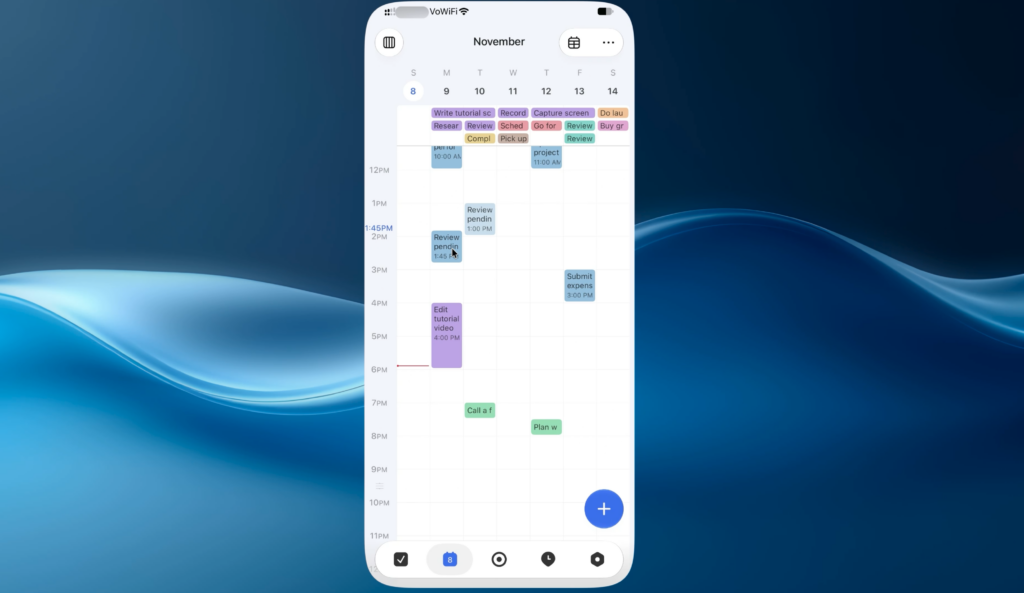
With Premium, you gain access to additional calendar views that make it easier to plan your schedule across different periods.
You can view your tasks by day, week, or month, depending on how much detail you need.
For example, the monthly view helps you identify upcoming deadlines, while the weekly view provides a closer look at your schedule.
The daily view is particularly useful when you need to organize several activities within a limited amount of time.
Instead of constantly switching between your task list and a separate calendar app, you can manage more of your schedule directly inside TickTick.
Why is this useful?
A regular to-do list tells you what needs to be done. A calendar helps you see when you have time to do it.
If your day involves meetings, deadlines, appointments, and personal commitments, TickTick Premium’s calendar views can make planning more convenient.
2. Time Blocking and Task Duration
Another valuable Premium feature is the ability to assign a start and end time to tasks.
This makes it possible to use a productivity technique called time blocking.
Time blocking involves reserving a specific period of your day for a particular activity.
For example, suppose you’re working on a video project. You could schedule:
- 9:00 AM – Review project updates
- 10:00 AM – Organize project documents
- 11:00 AM – Prepare video thumbnail
- 2:00 PM – Edit tutorial video
- 4:00 PM – Review completed work
By assigning time periods to your activities, you can visualize how much of your day is already occupied.
TickTick also allows you to adjust scheduled tasks directly from compatible calendar views.
If something takes longer than expected, you can rearrange your schedule accordingly.
Who benefits most? People who prefer structured schedules, manage several responsibilities, or frequently struggle with fitting tasks into their available time.
3. Timeline View for Project Management
If you’re working on projects that involve multiple stages, TickTick Premium’s Timeline View is worth exploring.
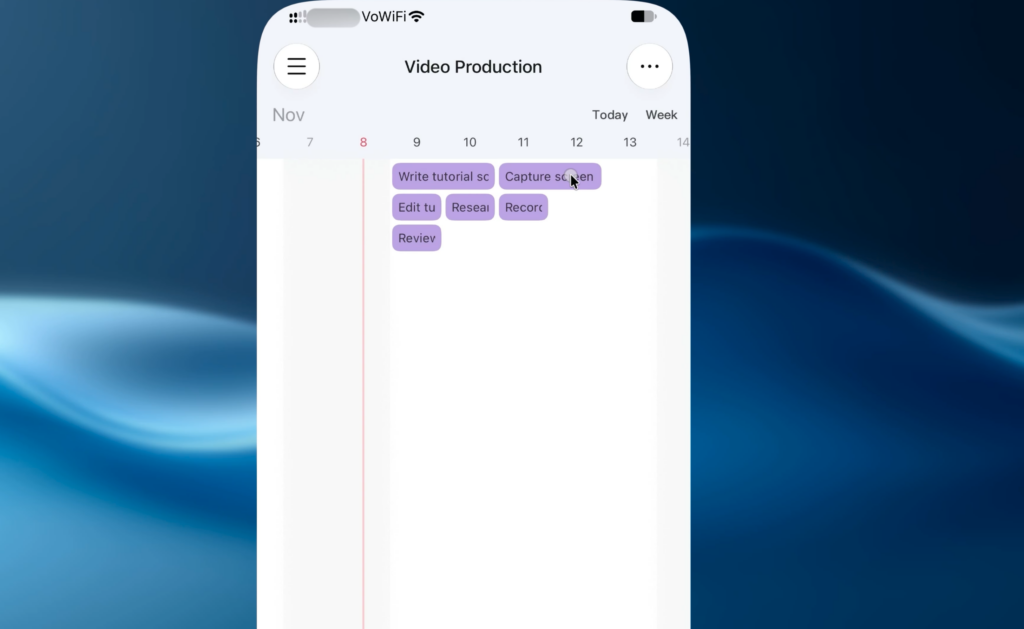
Unlike a traditional task list, Timeline View displays scheduled tasks across a horizontal timeline.
For example, a video production project might include:
- Research the topic
- Prepare the script
- Record narration
- Capture screen recordings
- Edit the video
- Create the thumbnail
- Review and publish
Some tasks may take only a few hours, while others could span several days.
Timeline View makes it easier to see how these activities fit into the overall project schedule.
You can also adjust task dates and duration from the timeline, making it helpful when deadlines or project requirements change.
This feature is particularly useful for content creators, freelancers, students, and anyone managing projects with multiple stages.
4. Custom Filters for Better Task Organization
As your TickTick account grows, you may accumulate dozens or even hundreds of tasks across different lists.
Finding the ones that need your attention can become increasingly difficult.
TickTick Premium addresses this problem with Custom Filters.
Filters allow you to display tasks that match specific conditions, such as their list, priority, or other supported properties.
For example, you could create a filter called “Priority Work” that displays only high-priority tasks from your Work list.
Instead of manually reviewing every task, you can simply open that filter to see the relevant items.
Custom Filters are particularly useful if you maintain separate lists for work, personal responsibilities, projects, and other activities.
They allow you to create focused views without moving tasks out of their original lists.
5. Advanced Reminders
Reminders are already available in TickTick’s free version, but Premium expands their capabilities.
Free users can assign up to two reminders per task, while Premium users can assign up to five.
This is useful when a deadline is important enough to require multiple notifications.
For example, if you have a project deadline on Friday, you might want reminders:
- One day before the deadline
- One hour before the deadline
- At the scheduled time
Premium also supports reminders for individual checklist items.
Suppose you have a task called “Publish YouTube Video” with several checklist items, including finalizing the thumbnail and reviewing the description.
You can assign a reminder to a specific checklist item without creating an entirely separate task.
TickTick Premium also offers email reminders, providing an additional notification method.
These features can be helpful when you’re managing important deadlines or complicated tasks with several steps.
6. Expanded Habit Tracking
TickTick isn’t just a task manager. It also includes a built-in habit tracker.
With the free version, you can track up to five habits.
TickTick Premium increases this limit to 299 habits.
This gives you considerably more flexibility if you want to maintain several personal and professional routines.
Some examples include:
- Reading for 20 minutes
- Drinking enough water
- Exercising regularly
- Learning a new language
- Practicing meditation
- Writing in a journal
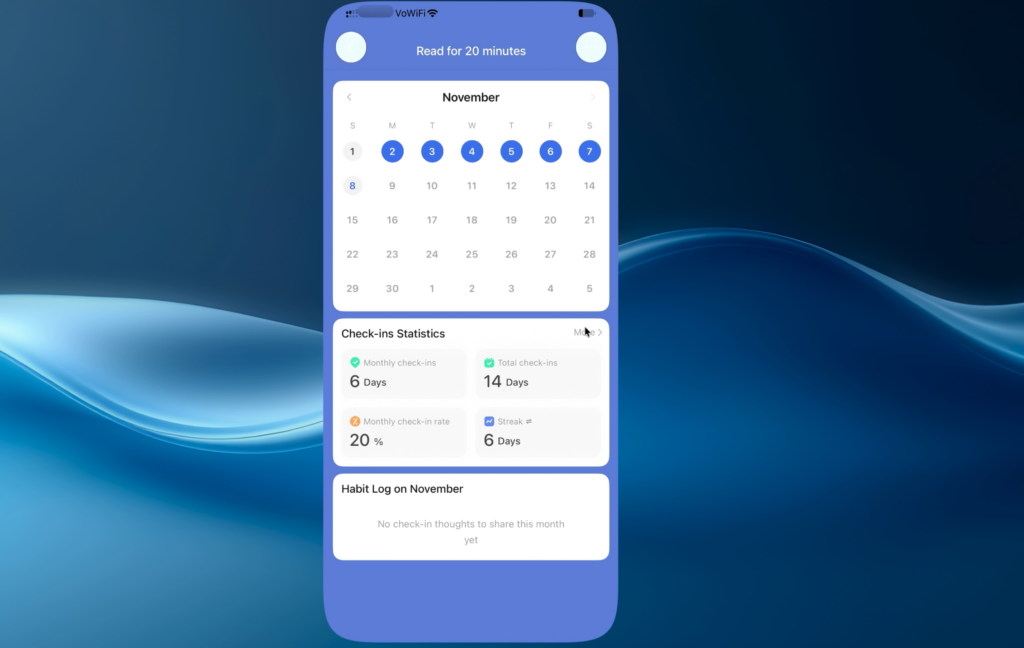
TickTick also provides habit records and statistics to help you review your consistency.
Habit tracking itself is not exclusive to Premium. The main advantage of upgrading is the significantly higher habit limit, along with expanded productivity capabilities.
If you’re only tracking a few routines, the free version may already be sufficient.
7. Focus Timer and Productivity Statistics
TickTick includes a built-in Focus Timer that can help you concentrate on individual tasks.
The app supports Pomodoro-style focus sessions, where you work for a designated period before taking a break.
The basic focus functionality is available in the free version.
With Premium, you can access additional focus-related features, including estimated Pomodoro sessions, additional sound options, and expanded statistics.
For example, you can estimate how much focus time a task requires and review your recorded activity afterward.
Over time, these statistics may help you understand how much time you spend on certain activities.
This can be useful when planning similar tasks in the future.
However, if you only need a basic timer to help you concentrate, you may not need Premium.
8. Higher Limits for Tasks, Lists, and Attachments
Another important difference between the free and Premium versions is their usage limits.
TickTick Premium allows you to create considerably more lists, tasks, and checklist items.
Here’s a comparison based on TickTick’s published Premium feature list:
| Feature | Free | Premium |
|---|---|---|
| Lists | 9 | 299 |
| Tasks per list | 99 | 999 |
| Checklist items per task | 19 | 199 |
| Task reminders | 2 | 5 |
| Habits | 5 | 299 |
| Attachments per day | 1 | 199 |
For someone who manages only a few personal lists, these limits might not be an issue.
But if you use TickTick extensively for work, school, or project management, Premium provides significantly more room to organize your activities.
The increased attachment allowance can also be helpful when you want to include reference documents, images, or other supporting files with your tasks.
9. Additional Customization Options
TickTick Premium also offers additional personalization features.
These include expanded theme options, more widget capabilities, and additional access to productivity tools such as the Eisenhower Matrix.
The Eisenhower Matrix helps organize tasks according to their urgency and importance.
Its basic functionality is available in the free version, while Premium expands its capabilities.
Similarly, TickTick provides basic widgets and statistics without a subscription, but Premium unlocks additional options.
These features may not be essential for everyone, but they can make the app more flexible for people who rely on it throughout the day.
TickTick Free vs. Premium: Which Should You Choose?
After exploring the additional features, the biggest question is whether they’re worth paying for.
The answer depends on how you use TickTick.
Stick With TickTick Free If:
- You primarily use TickTick as a simple to-do list.
- You only manage a few projects or task lists.
- Basic reminders are sufficient.
- You track five habits or fewer.
- You don’t need advanced calendar planning.
- You rarely reach the free version’s usage limits.
The free version is already capable of handling everyday task management.
For many casual users, upgrading may not be necessary.
Consider TickTick Premium If:
- You want advanced calendar views and time blocking.
- You frequently plan projects involving multiple stages.
- You need custom filters to organize large numbers of tasks.
- You want more reminders for important deadlines.
- You manage more lists and tasks than the free version allows.
- You want additional focus and productivity statistics.
- You regularly use TickTick as your main planning system.
For these users, Premium can turn TickTick into a more comprehensive productivity tool.
Final Verdict: Is TickTick Premium Worth It?
TickTick Premium offers several meaningful improvements over the free version, particularly for users who want more control over their schedules.
Among its most useful features are advanced calendar views, time blocking, Timeline View, and Custom Filters.
These features go beyond simply maintaining a list of things to do. They help you decide when to work on tasks, how to organize projects, and where to focus your attention.
However, upgrading isn’t automatically necessary.
If the free version already handles your daily responsibilities comfortably, there may be little reason to pay for additional features you won’t use.
TickTick Premium is most worthwhile when its advanced planning tools solve a problem you regularly encounter.
The best approach is to identify which Premium features you would actually use and decide whether those benefits justify the subscription price.
For more practical demonstrations of TickTick Premium on mobile, watch our video walkthrough on the Screenlumen YouTube channel.
And if you’re already using TickTick Premium, which feature do you find most useful?
Screenlumen publishes practical screen recording tutorials, app walkthroughs, and demonstrations to help you understand and use digital tools more effectively.
Feature availability, usage limits, and subscription pricing may change as TickTick updates its services.